Medical report check is essential and mandatory for working in Gulf Cooperation Council (GCC) countries like like Saudi Arabia, UAE, Qatar, Kuwait, Oman, or Bahrain. If you want to check your medical report, our website will assist you in verifying it and provide all the necessary information related to the process.
If you are planning to work in Gulf countries one of the most important steps is passing the GAMCA / Wafid medical test. After completing your test (blood, chest X-ray, etc.), the next step is to perform a Medical Report Check to verify your fitness status.
What is GAMCA / Wafid Medical Report?
GAMCA is just the old name people used before, while Wafid is the newer online system that replaced it for Gulf medical tests. The medical report determines whether you are:
- Fit to work in Gulf countries
- Free from infectious diseases
- Eligible for a work visa
In short, a Medical report check helps determine whether a person has any diseases or health issues and provides a clear overview of their physical fitness and medical condition.
Documents Required for Medical Report Check
Before starting your Medical Report Check, make sure you have the correct information ready. To check your GAMCA / Wafid report, you need:
- Passport Number
- Nationality
- Wafid Medical Slip Number
Medical Report Check Online Step by Step
Follow the steps below for Medical report check online. GAMCA and Wafid are the same system, so you can use either to check your report. You can complete the process in just a few simple steps. All the steps are explained clearly below along with screenshots for your convenience.
Quick Learning: 1) Visit medicalreportcheck.com → 2) Click on Start Check Button → 3) Enter Required Details (Passport information or Wafid Slip Number) → 4) Click on check → 5) Check Your Result.
Step 1: Visit the Official Wafid Platform
First, go to the official Wafid website to begin your Medical report check online process.
This is the only trusted platform where you can check your medical report status securely. Make sure you are visiting the correct website to avoid any confusion or fake sources. Click on below button to visit the official website directly.
Step 2: Choose Your Search Preference
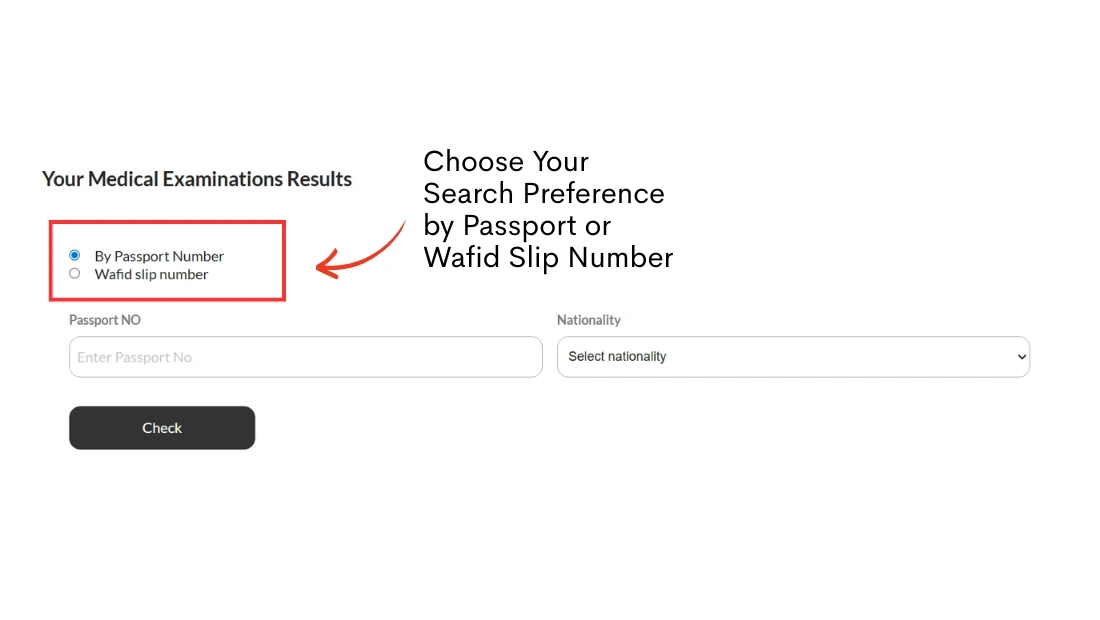
On the Wafid platform, you will be given two options to check your medical report:
By Passport Number
- This is the most commonly used method
- Simply enter your passport number
- Select your nationality from the dropdown
By Wafid Slip Number
- Use this option if you have your medical slip number
- Enter the slip number correctly as provided during registration
Choose the option that is most convenient for you. If you want to check your medical report using your passport number, choose the “By Passport Number” option. Alternatively, if you want to check using your Wafid slip number, choose the “Wafid Slip Number” option.
Step 3: Enter Required Details
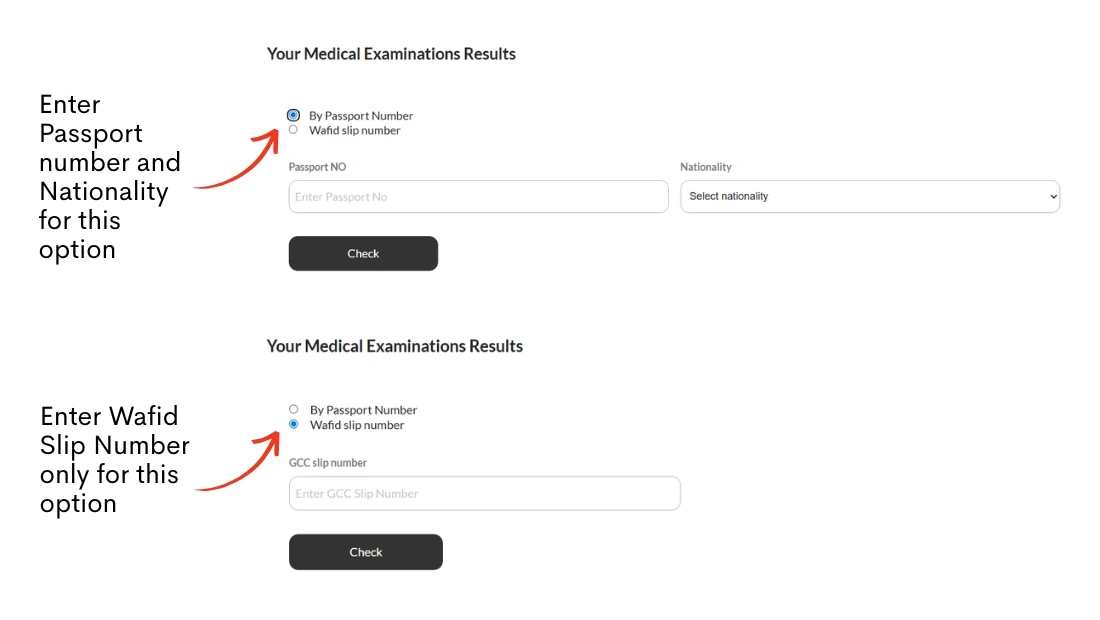
Once you have chosen your preferred method, enter your details carefully.
If you choose the by passport number option, provide your passport number and select your nationality from the form. On the other hand, if you choose the by Wafid slip option, enter your Wafid slip number.
Once you’ve filled in all the required information, make sure to double-check everything for accuracy before proceeding.
Step 4: Click on “Check”
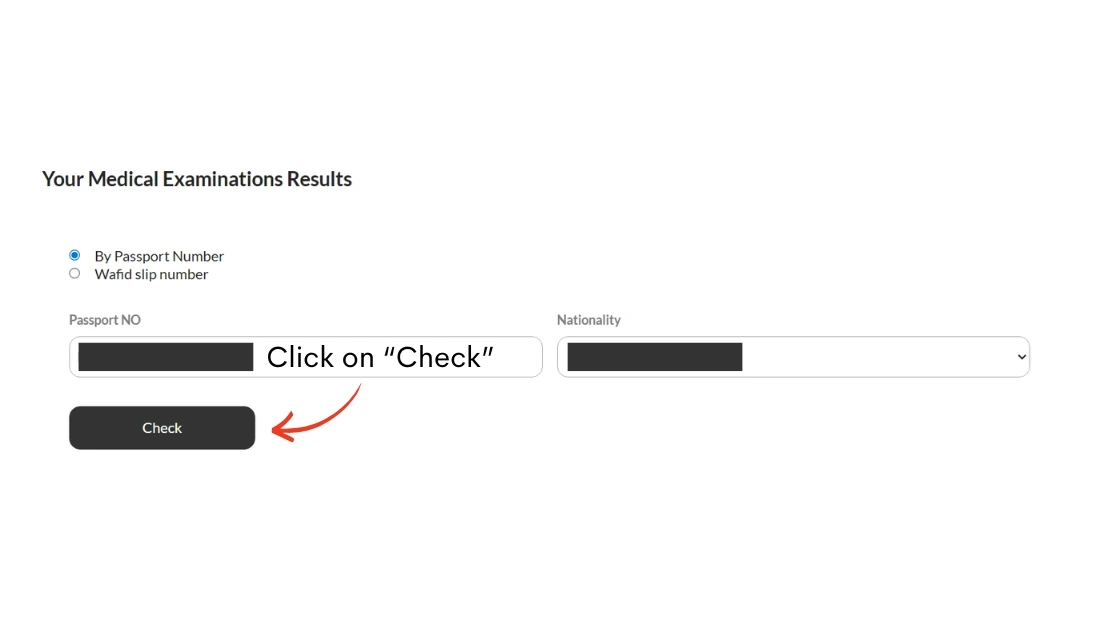
Once you’ve entered all the required details, click the Check button for Medical Report Check and allow a few seconds for the system to process your request, after which your medical report status will be displayed instantly on the screen.
Step 5: View Your Result
You will now see your medical status displayed on the screen, such as: FIT, UNFIT, REFERRED, IN-PROGRESS, after completing your Medical report check online. Make sure to read the result carefully and take the appropriate next steps based on your status.
Understanding Your Result Status
When you perform your check, you will see one of the following statuses. Here is what they mean for your travel plans:
| Status | Meaning | Next step |
|---|---|---|
| FIT | You have passed all required medical tests. No communicable diseases or disqualifying conditions were found. | Your report is valid for 60 to 90 days. Proceed with visa stamping. |
| UNFIT | One or more tests came back positive for a condition that is disqualified under GCC rules. | Don’t panic. Contact the medical center to ask for a detailed lab report. Some of them are treatable. You can retest after 6 to 12 months after treatment. However, some conditions (like HIV) may permanently block GCC work visas. |
| REFERRED | Some tests were inconclusive or need further specialist review. | Return to the medical center for additional testing. |
| IN-PROGRESS | Your tests are done, but the final decision has not been made. | Wait 24–48 hours and check again. If still In-Progress Contact your medical center. |
Common Reasons for Medical Unfit Status
Individuals may be declared medically unfit due to certain infectious or chronic health conditions that can pose risks to public health or limit their ability to perform required duties.
- Tuberculosis (TB)
- HIV/AIDS
- Hepatitis B or C
- Severe chronic diseases
- Abnormal chest X-ray findings
Countries Where Medical Report is Mandatory
The Wafid medical test is mandatory for employment visas in the following Gulf Cooperation Council (GCC) countries:
- Saudi Arabia
- United Arab Emirates (UAE)
- Qatar
- Oman
- Kuwait
- Bahrain
These countries require all expatriate workers to pass the medical fitness test before visa approval.
Medical Report Check for Saudi Visa
If you want to work in Saudi Arabia, you must finish your Medical Report Check after your GAMCA/Wafid medical test. Before you start the Saudi visa process, this check helps you make sure that your health is Fit or Unfit.
The Medical Report Check makes sure that you are healthy enough to meet the standards set by the Saudi government. You can move on with the visa stamping and other paperwork once your report says “Fit.” For the best results, you should do your Medical Report Check between 24 and 72 hours after your medical exam.
This step is necessary for everyone who wants to work in Saudi Arabia and helps keep the whole process moving along.
Advantages of the Online Medical Report Check System
There are many benefits to using the online Medical Report Check system for applicants. It saves time, lets you see results right away, and means you don’t have to go to a medical center in person.
The Medical Report Check makes it easy for applicants to keep track of their health from anywhere. This speeds up and makes the whole visa process easier.
When to Check Your Medical Report Status
The best time to perform your Medical Report Check is usually 24 to 72 hours after completing your medical test. If you check too soon, you may not see your result because the report is still being worked on.
Frequently Asked Questions (FAQ)
Below are some commonly asked questions related to the medical report process. This section will help you understand important details such as report status, validity, and next steps after your Medical report check.
How can I check my GAMCA / Wafid medical report?
You can check your report online using your passport number or wafid slip number form medicalreportcheck.com.
How long is a GAMCA / Wafid medical report valid?
Usually 3 months from the date of issue. For Saudi (Wafid), validity can be up to 6 months depending on the visa type. It is always recommended to confirm the validity period during your Medical report check before traveling.
What is Wafid?
Wafid is the new system that replaced GAMCA for GCC medical examinations.
Can I reapply if declared unfit?
Yes, but only after the required waiting period depending on the medical condition.
How long does it take for the report to appear online?
Typically 48 to 72 hours after your medical tests. In some busy centers, it may take 5–7 days.
Which Country Uses Wafid Medical Most?
Among all GCC countries, Saudi Arabia has the highest number of applicants using the Wafid (GAMCA) system, followed by UAE and Qatar.
Conclusion
The Medical Report Check process is a crucial step for anyone who planning to work in Gulf countries. By checking your report online, you can stay updated and avoid unnecessary delays in your visa process.
MedicalReportCheck.com exists to make one thing simple: knowing your medical status instantly. Enter correct details and regularly check your status after completing the medical test.